
Free Mac Barcode Fonts
ConnectCode Free Barcode Fonts for Mac is a generous barcode package that offers three robust barcodes for common use - Code 39, Industrial 2of5 and Postnet.
This a True Type Font (TTF) barcode fonts and can be used in the Mac OS X platform.
See Mac Barcode Fonts User Manual (PDF)
It lets you solve every day barcode requirements from simple items tagging to the creation of mailing labels. The versatility of the fonts makes them very useful because you can use them in almost any software that supports text input and font selection.
Or see the Windows Version of the Free Barcode Font
Barcodes Supported
Code 39 is one of the earliest and most popular barcode. It supports numbers, uppercase characters and several punctuation characters.
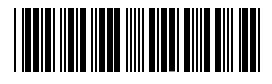
Industrial 2of5 is a widely used barcode for encoding numbers. It is called 2of5 because the barcode is always encoded with 2 wide bars and 3 narrow bars (total of 5 bars). Each of the bars is separated by a narrow space.
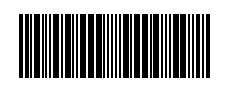
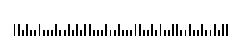
Postnet is a fixed width/height barcode that is used widely by the U.S. Postal Service. It encodes numeric digits by using 5 bars and 4 spaces. The bars have two different bar heights, short and tall.
Installing the fonts on Macintosh OS X (Mac OS X)
- First, you will need to close any open applications. The new fonts do not appear in the application if you install them while the application is open.
- Copy and paste the TrueType Font files (ConnectCodePostnet.ttf , ConnectCodeIND2of5.ttf and ConnectCode39.ttf) to the Library/Fonts folder.
- Restart the application and the fonts should appear in the font menu.
Download
System Requirements
- Mac OS 7.x/8.x/9.x/10.x
ZIP Format
Overview of what the installer does- Install Barcode Font Encoder for Mac executable on your system.
- On your Mac, open your Applications folder. Browse for the program (ConnectCode Free Barcode Software) that you want to uninstall.
- Drag the program or folder of programs that you wish to delete to the Trash.
Mac and Mac OS are trademarks of Apple Inc., registered in the U.S. and other countries. All other product names are trademarks, registered trademarks, or service marks of their respective owners